On this page
In most clinics, salons and consulting offices in Nepal, bookings still come in by phone call, Viber and WhatsApp. Someone at the front desk writes them in a notebook, or the owner keeps them in their head. It works until two people are promised the same 4 pm slot, or a patient forgets and does not show up.
Online booking does not have to mean an expensive clinic management system. This guide explains how to let people book from your page, choosing a service and a free time slot themselves, while you stay in control of your hours.
Why phone-only booking is costly
- Interruptions. A stylist mid-haircut or a doctor mid-consultation cannot keep answering the phone.
- Missed calls are missed bookings. People who call during your lunch break or after closing often do not try again.
- Double bookings happen when two people take calls or one person forgets to write a booking down.
- No-shows. Without a reminder, some people simply forget.
An online booking page does not fix all of this, but it takes most of the routine work off you and your staff.
How online booking works on golinq.me
You add a booking button to your page. A visitor taps it, chooses a service, picks a date, and sees only the times that are actually free. They enter their name, phone or email and a short note, and confirm. The booking appears in your dashboard, and it is also saved to your contacts, so you have their details for next time.
You receive an email for each new booking, with a calendar file attached. If the visitor gave an email address, they get a confirmation too, and both of you get a reminder email about 24 hours before the appointment. The visitor's confirmation includes a link they can use to cancel if their plans change, so the slot opens up for someone else instead of sitting empty.
Setting it up, step by step
- Set your weekly hours. For each day, add the hours you take appointments. You can have more than one window a day, for example 10:00–13:00 and 15:00–18:00 with a lunch break. Leave Saturday empty if you are closed.
- Add your services. Each has a name, how long it takes, and optionally a price, for example "General consultation, 20 minutes, NPR 1,000" or "Hair colour, 2 hours, NPR 4,500".
- Choose the slot length and a buffer. A buffer of 10–15 minutes between appointments gives you time to clean up, write notes or catch up when someone runs late.
- Set minimum notice and how far ahead people can book. For example, at least 2 hours' notice and no more than 30 days ahead.
- Decide whether you approve bookings. Turn on approval if you want to confirm each request yourself before it is final. Leave it off to confirm automatically.
- Add holidays and days off. Block out dates when you are closed, such as festival holidays or a day you are away, so nobody can book them.
- Say where the appointment happens. In person with your address, by phone, or by video call. For video, add your own meeting room link (Zoom, Google Meet and similar), or connect Google Calendar so confirmed bookings get a calendar event with a Meet link.
- Add the booking block to your page, near the top, and test it by booking a slot yourself.
Managing appointments day to day
Your bookings dashboard shows what is coming up. For each appointment you can confirm it, reschedule it, cancel it with a reason, mark it completed, or mark it as a no-show. Keeping those statuses accurate helps you see which days are busiest and which clients often do not turn up.
Phone and walk-in bookings still happen, and that is fine. Many businesses have the front desk add those calls as bookings too, so the online calendar is the one place that shows who is coming.
Tips for clinics
- Separate first visits from follow-ups as different services with different lengths.
- Put fees on the page. Patients appreciate knowing the consultation fee before they come.
- Use the instructions field for what to bring: previous reports, a prescription, an ID, fasting before a test.
- Keep emergencies off the booking page. Add a clear line with your emergency number instead.
- Add a map pin, especially if the clinic is inside a larger building or hospital.
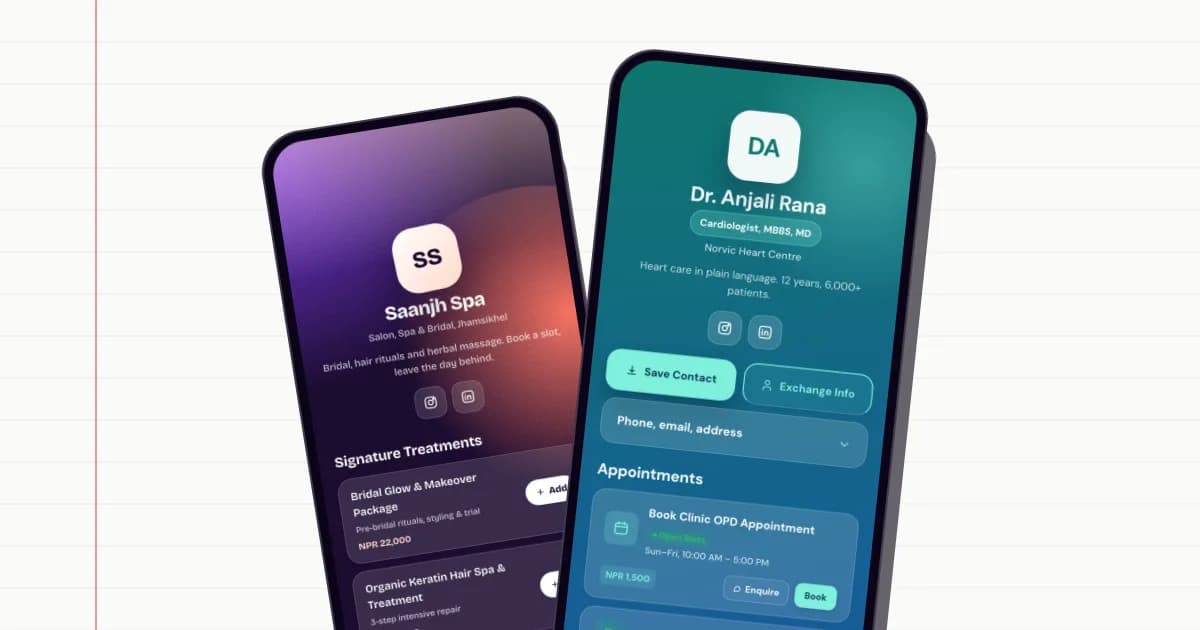
The doctor template shows a clinic page with a booking button, fees, location and qualifications.
Tips for salons and spas
- List services by real duration. A cut and blow-dry is not the same slot as a balayage or bridal trial.
- Show your work. Link your Instagram or add a gallery of recent results next to the booking button.
- Use approval for long, expensive services like bridal packages, where you may want to talk to the client first.
- Remind regulars. Share your booking link in WhatsApp when a client leaves, so next time they book themselves.
See the salon and spa template for a finished example.
Getting people to use it
A booking page only helps if people know about it. Put the link in your WhatsApp Business profile and your auto-reply message, in your Instagram and Facebook bio, and in your Google Business listing. Print a QR code for the reception desk and the mirror at each salon station. When someone calls, tell them they can also book online next time.
Most people will not switch overnight, and that is fine. Every booking made online is one less call to answer.
Make your golinq.me page today
Pick your handle, start from a template for your trade, and share it by QR, NFC or link. The Personal plan is free; see pricing for bookings, the shop and dynamic QR codes.